The operating system for serious music creators. A calm, workhorse dashboard that helps you ship.
Kora replaces scattered notes, task apps, spreadsheets, and messy folders with one creator-native system. Plan albums and projects, track deliverables, and stay on top of follow-ups — with AI that works with you (not against you).
Not your computer operating system — your daily system for albums, relationships, and delivery.
Creator-first AI policy
We do not use your data to train generative music models or any competing systems. Your work stays yours. Kora is built to help creators compete and grow in the age of AI — not replace them.
Your data is used only to power your planning experience. If/when cloud features are enabled, we'll keep this same promise.
- A complete view of multi-album, multi-project timelines — so you always know what’s due, what’s next, and what’s slipping.
- Built-in workflows: briefs, progress bars, DAW linking, exports, notes, follow-ups, and focus sessions — designed for professional delivery.
- Creator-first AI policy: we do not train generative music models on your data. Kora helps you compete and grow — not replace you.
Mac-first at launch · iPhone app + widgets coming soon · unsubscribe anytime.
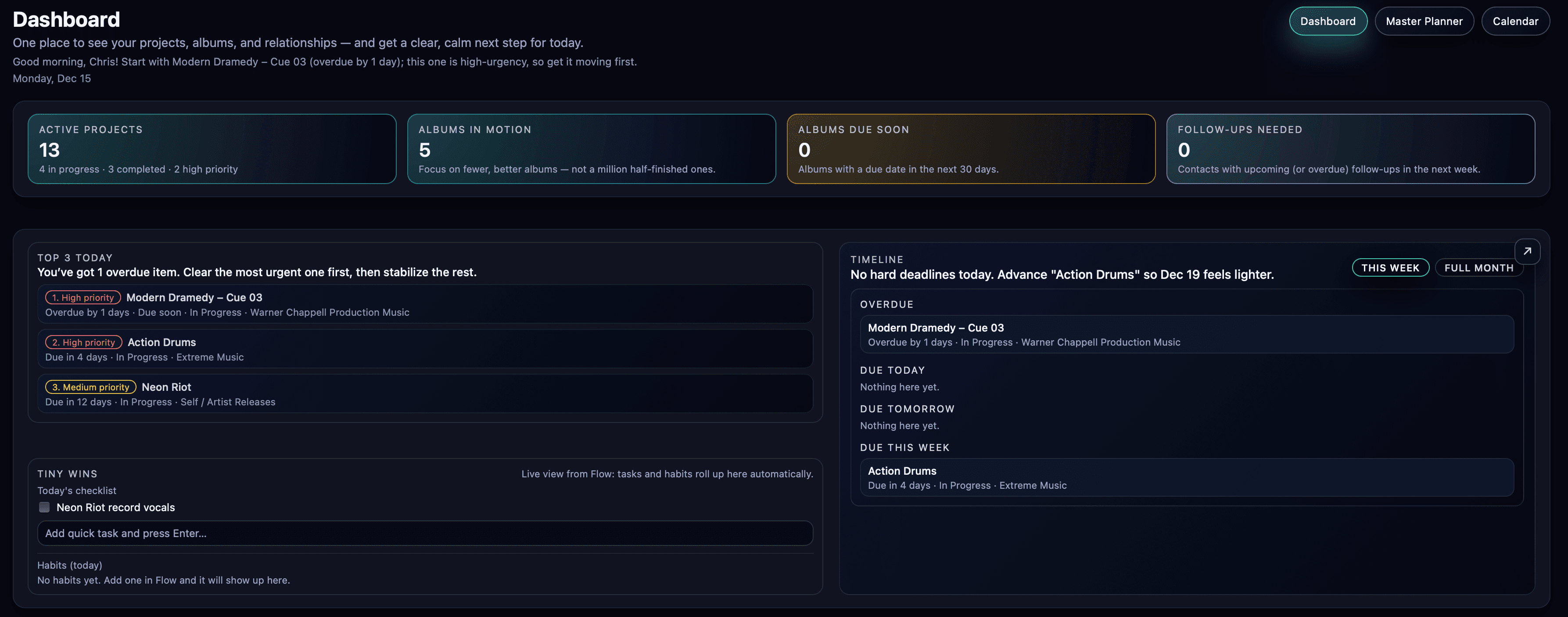
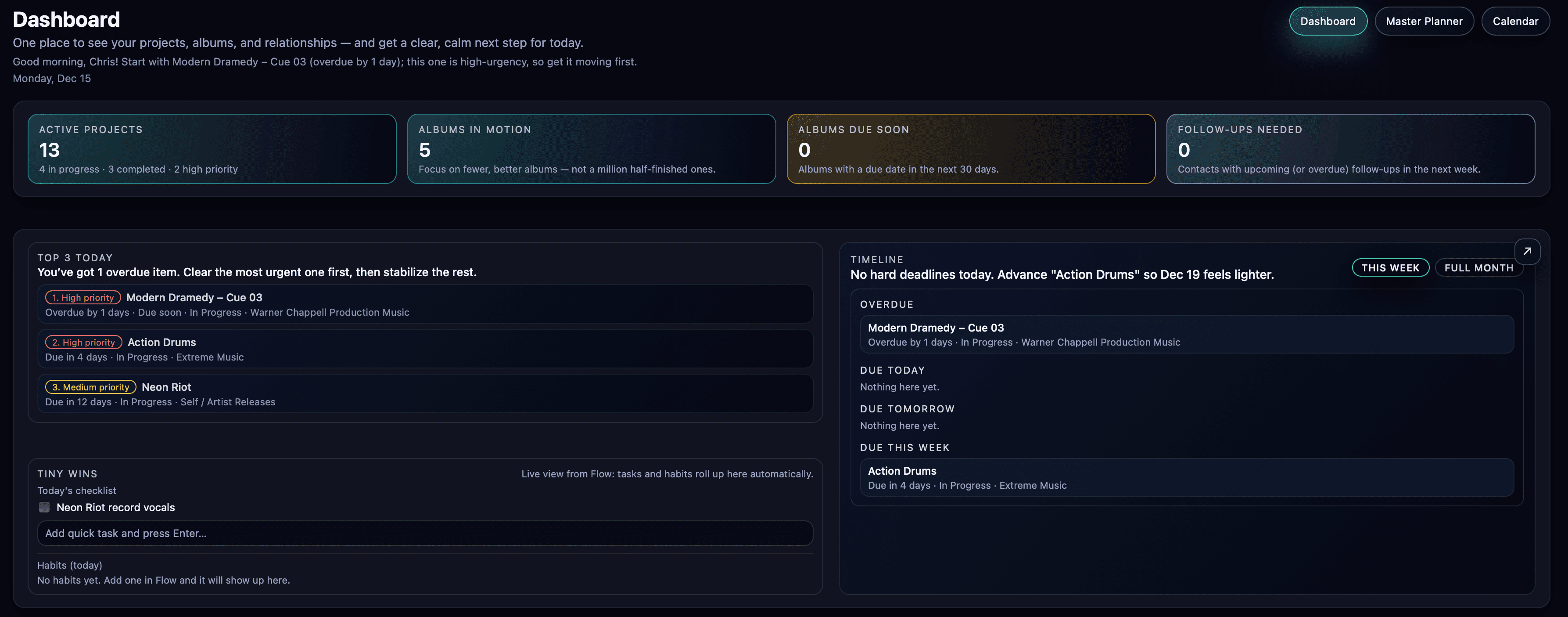
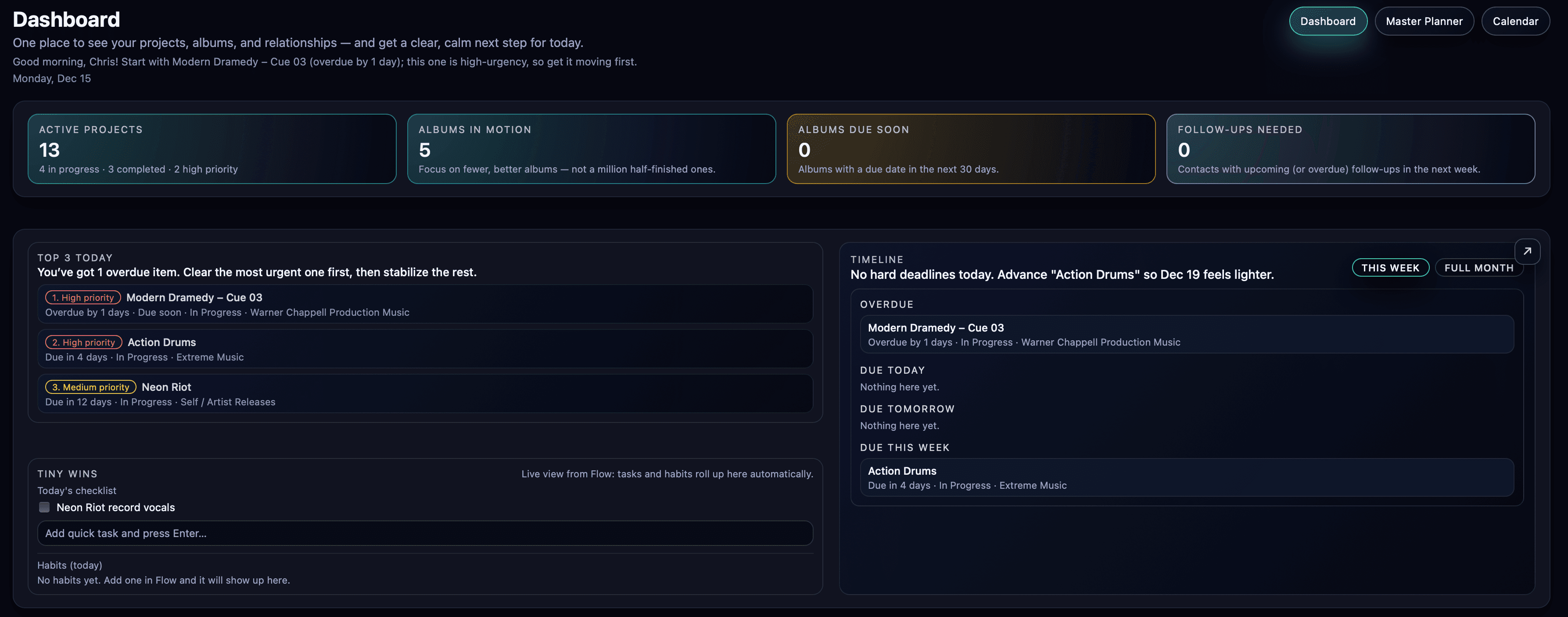
Top 3 today
Auto-picked by Kora- 1 · Finish mix tweaks on Sports Promo – Main EditDue today · High
- 2 · Outline next 3 tracks for Ad Pop albumWarner · Medium
- 3 · Prep deliverables list for Kora v1 launchSoniteq · Planning
Projects
- Warner – Ad Pop Album3 tracks in progress
- Sports SDX – Impacts12 cues
- Kora v1 LaunchRoadmap draft
Focus mode
Kora hides everything except what you committed to for this block. When the session ends, it suggests a realistic next block based on remaining energy and deadlines.
Your dashboard, your workflow
Kora is modular by design. Turn on the tools you need, hide the fluff, and keep the whole creator pipeline visible—from albums and deadlines to follow-ups, exports, and focus blocks.
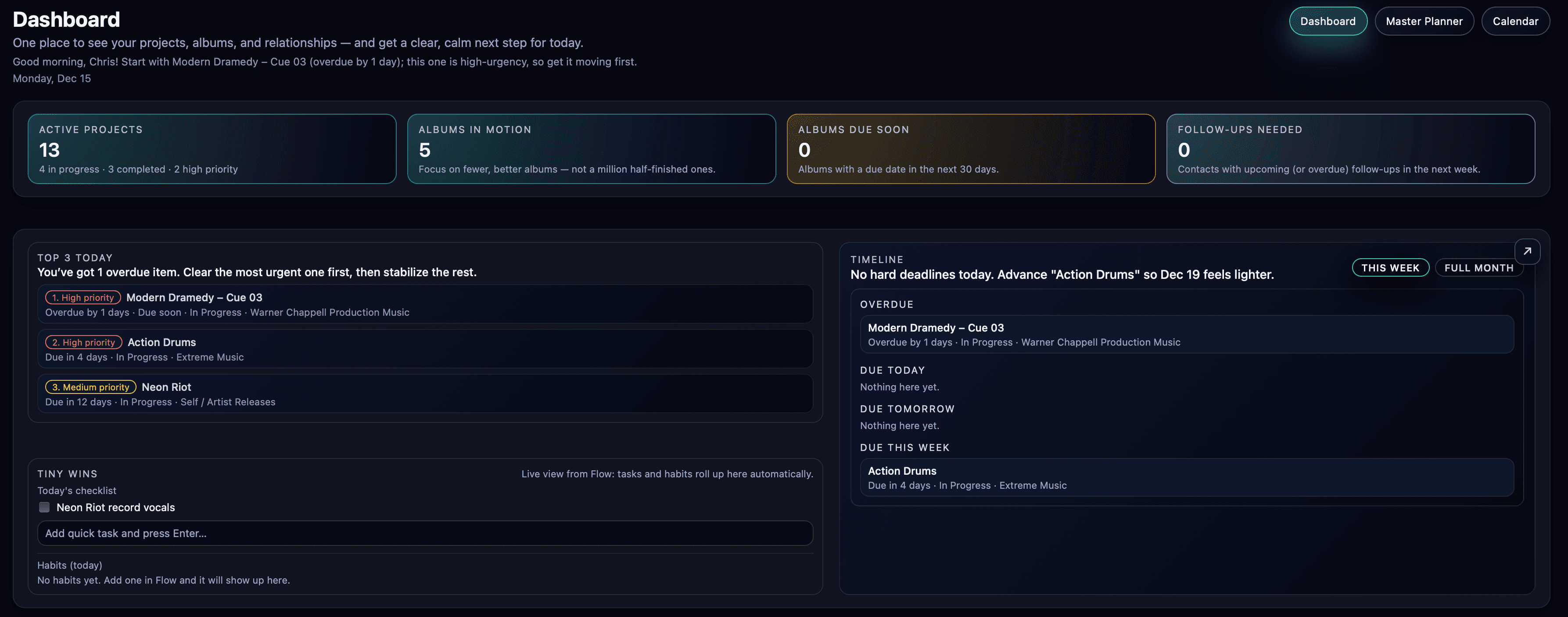
Placeholder image: /public/kora/placeholder-dashboard.png
Top 3 Today
AI-picked priorities from deadlines, urgency, and workload.
Albums in Motion
Briefs, track targets, progress bars, and delivery status.
Follow-ups Due
Never miss a publisher/library touchpoint again.
Projects
DAW links, milestones, and real-world timelines.
Whiteboard Notes
Notes that attach to albums, projects, contacts, or tasks.
Calendar
Daily / weekly / monthly views built for creative seasons.
Focus Timer
Pomodoro + deep work blocks tied to real work.
Delivery Tools
Folder watching, naming systems, metadata, and exports.
Replaces
Stop duct-taping a multi-app stack. Kora consolidates it all into one creator-native system. Kora adds more power to your workflow while reducing app fatigue, context switching, and scattered data.
You can still keep your favorite tools — Kora simply makes them optional.
How Kora thinks about your week
Instead of juggling dozens of tasks across random lists, Kora gives you a clear lane for today, the week, and upcoming commitments—rooted in the reality of your workload.
1 · Capture & connect
Add projects, tracks, and tasks in simple language. Tag them with clients, publishers, or labels so Kora understands what's important.
2 · Let Kora prioritize
Kora weighs deadlines, status, and priority levels (plus notes you give it) to surface a realistic Top 3 and supportive tasks.
3 · Focus & review
Work in focused blocks, then review what moved. Kora suggests what to pull forward tomorrow so nothing important slips.
AI that works with you
Kora uses AI to reduce decision fatigue—not to replace your creativity. It helps you prioritize, summarize, and follow through with mood-based, context-aware guidance. Your profile, your mood, and your workload shape how it speaks. Let AI handle the busywork, so you can focus on the music. Fuel your creativity, not fight to find it.
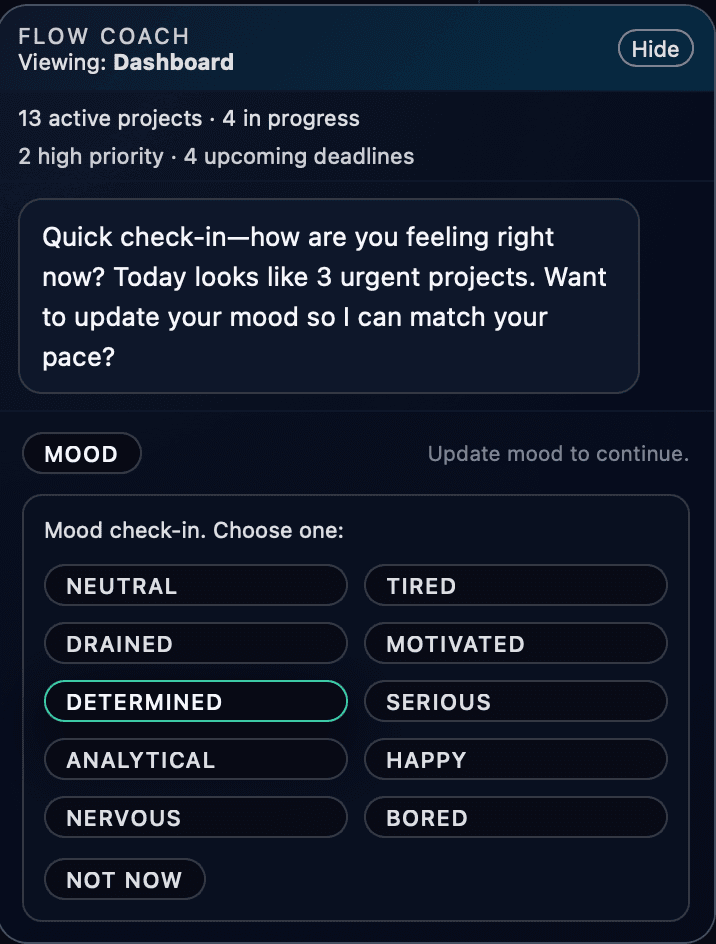
Placeholder image: /public/kora/placeholder-ai-coach.png
AI Flow Coach (Chatbot)
A mood-based assistant that helps you pick the next right work—without kitchen-sink responses.Urgency is balanced against deep work, context, and your creative rhythm.
- • Explains why something is urgent
- • Balances deep work vs admin
- • Keeps momentum without burnout
- • Focuses on shipping over busywork
- • Powered by your creative profile
- • Adjusts tone based on your mood
- • Chat-GPT-5-mini powered on Creator and Pro plans
Smart summaries
Instant context on albums, projects, and relationships so you don’t re-read everything.
- • Album + project status summaries
- • Follow-up context before you send
- • Morning brief + nightly recap (optional)
Creator-first policy
AI that supports your career—without training on your work or building competing systems.
- • No training generative music models
- • Scoped, assistive AI
- • Your work stays yours—always
Privacy + control
Kora can run local-first, and when cloud features are enabled, your data is still never used to train generative or competing systems. You get the upside of AI without the downside.
Why Kora exists
Kora exists because creators deserve a system that respects the reality of making music for a living. Missed follow-ups, messy project files, and burnout from constant uncertainty are solvable — with the right operating system.
The promise
Kora is built to help creators compete and grow in the age of AI — not replace them. Your work stays yours.
Creator-first by design
Language, defaults, and workflows are built around albums, briefs, deliverables, and relationship follow-ups.
Local-first foundation
Kora Local runs offline and stays private by default. You control your data and your workflow.
Relationships stay warm
Follow-ups are tracked with context so publisher, library, and client touchpoints don’t slip through the cracks.
Built to help you compete
We do not use your data to train generative music models or competing systems — Kora exists to help creators grow, not replace them.
Competitive comparison
Kora isn’t trying to be a generic productivity app. It’s a creator operating system — built around albums, deliverables, and relationships.
Built for creators
Albums, briefs, deliverables, and follow-ups are first-class — not templates you have to reinvent.
Calm prioritization
Your Top 3 is picked from real context: deadlines, relationship urgency, and workload reality. Mood based language keeps you grounded.
Delivery compounds
Export Flow + Key Shift Pro turn naming, metadata, and exports into a repeatable system.
Where Kora wins
A fair, creator-focused view of alternatives.
See full comparison →Hide comparison
Where Kora wins
A fair, creator-focused view of alternatives.
Docs & knowledge bases
Examples: Notion, Evernote, Whiteboard apps
They do well
Flexible notes, databases, templates, second-brain capture.
They fall short
Not anchored to deliverables: deadlines, follow-ups, and creator-specific objects become DIY workarounds.
Kora wins by
Notes attach to real creative objects (albums, projects, contacts) so planning stays operational, not theoretical.
Project management
Examples: Trello, ClickUp, Monday, Basecamp
They do well
Boards, assignments, automations, team workflows.
They fall short
Built for generic work. Creative pipelines (albums, cues, briefs, exports) require heavy customization.
Kora wins by
Creator-native structure: album + track planning, briefs, due dates, and delivery-minded states without enterprise noise.
Tasks, habits & focus timers
Examples: Todoist, TickTick, Blitzit, Pomodoro apps
They do well
Fast capture, checklists, recurring tasks, timers, habit tracking.
They fall short
Great for personal productivity, but they don’t understand creative inventory or relationship urgency.
Kora wins by
Your Top 3 is chosen from real creative context: deadlines, priorities, follow-ups, and workload reality.
AI scheduling & assistants
Examples: Motion, Fyxer.ai, general AI tools
They do well
Auto-scheduling, summaries, email drafting, admin assistance.
They fall short
They don’t know your albums, briefs, deliverables, or what ‘done’ means in a production workflow.
Kora wins by
AI is grounded in your creative objects and creator-first policy — built to help you ship, not replace you.
CRM systems
Examples: HubSpot
They do well
Pipelines, reporting, sales automation.
They fall short
Optimized for sales teams — not publisher/library relationships, pitches, and creative follow-up cadence.
Kora wins by
Relationship tracking for creators: follow-ups, context, and the music you’re pitching in one place.
Audio delivery utilities
Examples: Rebounce, Bounce Butler, AudioFile Calc
They do well
Export helpers, review links, batch workflows.
They fall short
They solve one slice (exports or review), but they don’t manage the full creator pipeline end-to-end.
Kora wins by
Export Flow + Key Shift Pro integrate delivery into your planning system: naming, metadata, recipes, and validation.
We respect great tools — Kora’s goal is to be the first one that truly fits the creator pipeline end-to-end.
Audio in context
Kora includes a music player module with SoundCloud-style timeline notes. Listen, leave timestamped feedback, and keep revision notes attached to the project or album—so nothing disappears into chat threads.
Placeholder image: /public/kora/placeholder-audio-player.png
Timeline notes
Add notes at exact timestamps for mix tweaks, arrangement ideas, or client feedback.
Revision clarity
Keep notes attached to the work so revisions don’t get lost and versions stay clean.
Better handoffs
Timestamp notes + delivery tools = cleaner exports, faster approvals, and fewer back-and-forth messages.
Before Kora / After Kora
The difference isn’t more features — it’s one system that replaces a multi-app setup and keeps the whole creator pipeline visible.
Before
Scattered, stressful, and easy to drop the ball
- • Follow-ups buried in email threads, notes, and memory.
- • Project files and exports spread across drives and folders with unrecognizable names or unorganized copies.
- • Albums tracked in spreadsheets or half-finished dashboards.
- • Too many apps that don’t talk to each other.
- • Creative burnout from never knowing what matters most today.
After
Calm clarity — one creator-native system
- • Follow-ups tracked with context: who, when, and what you pitched.
- • Albums + projects + briefs + progress bars in one place.
- • Notes that link directly to albums, projects, contacts, and tasks.
- • DAW linking, exports, and delivery workflows built-in.
- • A realistic Top 3 Today — picked from deadlines, urgency, and workload.
Built for how you work
Kora is the complete creative operating system for composers, producers, artists, and teams who need a streamlined view of multiple albums and projects—without missed follow-ups or burnout.
Production Music & Sync Composers
Multi-album output, briefs, deadlines, and follow-ups—without the chaos.
- • Multi-album timelines + progress bars
- • Publisher/library follow-ups with context
- • Delivery workflows: exports, naming, metadata
Artists & EDM Producers
More finished songs. Less burnout. Clear momentum every day.
- • Project clarity + calendar blocks
- • Mood-based language that keeps you grounded
- • Audio timeline notes for feedback + revisions
Producers, Beatmakers & Writers
Turn sessions into shipped work with fast organization and repeatable delivery.
- • Link any DAW session
- • Whiteboard templates for hooks, drops, and briefs
- • Export folder monitoring + quick deliverables
Media / Film / Game Composers
Keep revisions, versions, and deadlines visible across multiple clients.
- • Client/project context at a glance
- • Audio player + timestamp notes
- • Clean handoffs with delivery-grade exports
Placeholder image: /public/kora/placeholder-calendar.png
Placeholder image: /public/kora/placeholder-whiteboard.png
Link any DAW
Ableton, Logic, FL Studio, Pro Tools, Reaper—Kora links sessions so you can jump into the work instantly.
Delivery monitoring
Export folder monitoring, file naming systems, metadata editing, and converter tools—built for real delivery.
Optional Gmail context
Pull context into follow-ups and drafts without living in your inbox. Read-only integration (optional).
Pricing that respects the work
Most creators pay for a stack: notes + tasks + calendar + CRM + timers + spreadsheets — then still miss follow-ups and lose time to chaos. Kora replaces the stack with one system built for albums, relationships, and delivery.
Kora Local
$14 / month
Replace your basic stack with a private, offline-first creator system.
- • Projects, albums, track planning, and briefs
- • Timeline + due dates + follow-ups
- • Local coach (rules-based) + Focus Timer
- • No cloud, no mobile, no advanced AI
Creator
$25 / month
The full workhorse: smarter planning, stronger momentum, and creator-native workflows.
- • Everything in Kora Local
- • Advanced AI planning + smarter Top 3 Today
- • iPhone app link + iPhone widgets
- • Tools page modules (grows over time)
Pro
$50 / month
For high-volume output: more AI, continuity, and delivery-grade automation.
- • Everything in Creator
- • Extended AI access (heavier daily usage)
- • Cloud storage + cross-device continuity
- • Keep most recent exports linked to projects across devices
You can stay on Kora Local forever — upgrades are optional.
Master feature comparison
Compare Kora Local, Creator, and Pro at a glance.
Click to expandClick to collapse
Master feature comparison
Compare Kora Local, Creator, and Pro at a glance.
| Feature | Kora Local | Creator | Pro |
|---|---|---|---|
Offline-first (local-only) Runs without cloud sync. | ✓ Included | ✓ Included | ✓ Included |
Projects + albums + briefs | ✓ Included | ✓ Included | ✓ Included |
Timeline + due dates + follow-ups | ✓ Included | ✓ Included | ✓ Included |
Local coach (rules-based) No external AI calls. | ✓ Included | ✓ Included | ✓ Included |
Basic integrations Connect your workflow with essential apps. | ✓ Included | ✓ Included | ✓ Included |
Tools page modules Tools expand over time. | Basic | ✓ Included | ✓ Included |
Key Shift Pro with Render Fast key changes + render/export flow. | — | ✓ Included | ✓ Included |
Cross-device continuity Sync your projects across devices. | — | ✓ Included | ✓ Included |
Advanced AI planning Smarter daily prioritization and richer summaries. | — | ✓ Included | ✓ Included |
iPhone app link | — | ✓ Included | ✓ Included |
iPhone widgets | — | ✓ Included | ✓ Included |
Extended AI access Higher daily usage for power workflows. | — | — | ✓ Included |
Cloud storage Backed-up storage for your synced data. | — | — | ✓ Included |
Advanced integrations Deeper automation and higher-leverage connections. | — | — | ✓ Included |
Cross-device project export linking Keep most recent exports linked across devices. | — | — | ✓ Included |
Team collaboration Studio / Teams / Institutional (coming soon). | — | — | — |
This checklist will evolve as features ship. We'll keep it honest and creator-first.
Coming soon
Studio (multi-user floating logins), Teams (dedicated team spaces), Institutional (campus licensing), and Student EDU pricing.
Early access
Tell us a bit about your workflow and we'll reach out when we open the next wave.
- • Early users influence features, language, and defaults.
- • Expect focused updates — no spam, no noise.
- • You'll be first in line for launch specials.
Submit to join the list. We'll only email about early access and launch updates.
Prefer DM? Reach out via your usual channel and we'll get you in the early wave.
FAQ
Is there a free plan?
Not at launch. Kora is built to be meaningfully valuable from day one — especially the offline Kora Local plan. Expect time-limited trials and launch specials instead of a permanently free tier.
What makes Kora different from generic task apps?
Kora understands creative reality: albums, briefs, deliverables, follow-ups, and deep work. It doesn't just store tasks — it helps you pick the right work when your attention is limited.
Can I stay local-only?
Yes. Kora Local is intentionally offline-first. Creator and Pro add AI + mobile + cloud features for creators who want cross-device continuity.
When will Teams / Studio / Institutional be available?
After the solo workflow is battle-tested. Early access users help shape what multi-user collaboration should feel like for studios and music programs.
Looking for audio tooling instead? Check out Key Shift Pro →